| https://www.youtube.com/watch?v=09VgM_BlBlg |
| Drag and drop software: Here is the link: https://github.com/HerMajestyDrMona/Windows11DragAndDropToTaskbarFix |
| The dll file fix: Here is the link to download: https://www.dll-files.com/vcruntime140.dll.html |
| 1 When Servicing or Installing Windows 11 do not have any external Peripherals attached to the PC. |
| 2 DO NOT use any type of Peripherals: IE KVM Switch or USB Switch. A lot of PC's will give you a heap of problems. |
| 3 Connect the Keyboard, Mouse and Monitor directly to the PC. |
Video 1:
Video 2:
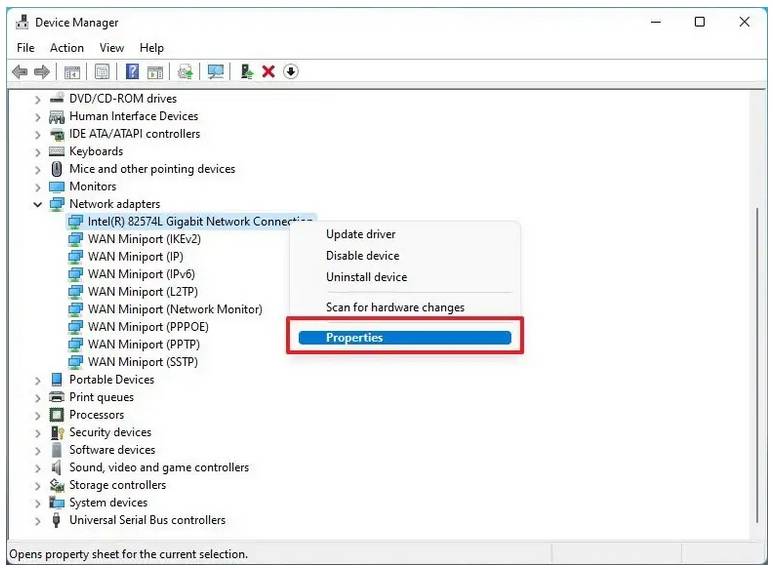
| If your PC is starting up over night while you are sleeping then check your Network Card in Device Manager |
 |
| If the settings are set to Allow devices to Wake the computer is check marked, then uncheck it. |
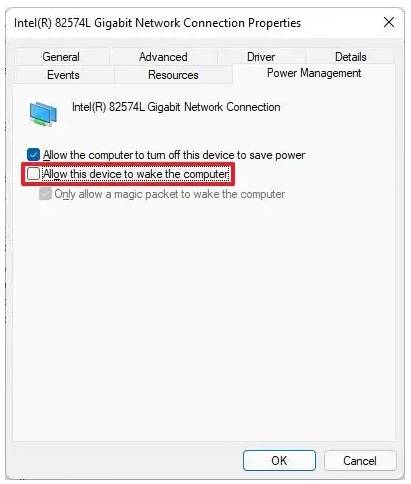 |
| Click OK to exit. |